Amazon

Showing posts with label tips. Show all posts

Wednesday, January 19, 2011

What You Do When You Break Your Camera

Don’t Panic

As with any unfortunate event, the key is to not panic. Falling to pieces and getting overly emotional about the event will not help keep your mind clear and make the most of the situation. Panicking leads to other mistakes, which can be costly in their own right. Keep your cool! A bit of profanity is permissible.

Grab The Pieces, All Of Them

Once you are finished with your (minor) freak out, because you didn’t listen to my first bit of advice, start picking up the pieces. Unless you are in a calm setting, such as at home in the kitchen, you are probably out in public and need to make sure all the bits are grabbed before they get scattered. Enlist help if need be. You never know which little piece will be helpful in getting things back together. Even if it looks unimportant, grab it.

Take Out The Battery

If your battery hasn’t flown free from your camera and skittered half a mile away (I swear most camera batteries are built with self preservation instincts and fly free from a breaking camera at the first sign of trouble) now is a good time to take it out. If your camera is partially functioning, more damage can be done from parts trying to move when they don’t quite line up. I’l admit I haven’t always followed this advice. Which is why I now suggest this advice. Accept your fate and deal with it. Power off your camera completely to avoid additional damage.

Grab Your Flash Card

I have actually sent back a camera for repair with the card still in it. This, again, comes from the first point. I got all freaked out about the damage and didn’t grab my card, even a few days later. The irony is I often hear people tell me, “If I dropped my camera in the lake, that’s that!” When in reality it often is not “that”. Your card is a solid state device and, barring electric jolt, will retain the images recorded to it. Corrosives will cause damage, but a quick dunk in a pool of water, while a bad thing for your camera and the electricity it carries, is not necessarily fatal to your images. Grab that card out and dry it off, completely. Heck, you may even have one interesting last image as your camera met its fate.

Do No Harm

Guilty, yet again. I have tried to fix my semi-broken cameras before. That typically made them completely broken cameras. And made the repair bill higher. Unless you are a pro at this type of fixing, your expensive DSLR is not a good item on which to start learning about camera repair. Leave it to the pros.

Check Your Warranty

Before you send in your camera for repair, they’ll want to know about your warranty. This starts with recording the information some place logical and easy to retrieve. Maybe in online email. Maybe on your cell phone (if you are on a trip). Maybe a tattoo. Whatever works for you, when you buy a camera, record this information for easy retrieval. I once failed to send in a computer for repair because I thought it was past the warranty and the reciept was burried in years of boxed paper. So I put it off for a month. When I found the receipt I learned I was now out of the warranty period, but I wasn’t when the incident occurred. Having an easy way to find this information will make life easier when it is already stressful.
Also check to see what your warranty covers. Most won’t cover negligence (accidents) and other incidents. Know before you have something go wrong.

Check Your Insurance

If the warranty won’t cover an accident, it is possible a homeowners or renters insurance policy will. Again, make sure the information is easy to find and understand the limits before using it.

Know Your Repair Options

Not everything needs to head back to the manufacturer’s factory. Local camera shops often offer repair and the service and price varies greatly. Most large brands will offer a free estimate before proceeding with a repair, much like a car mechanic should. In one incident I found the repair to be more than a replacement. In another (yes, I have dropped more than one camera) the repair cost was much less than I anticipated and I was pleasantly surprised. Ask around and get as many free estimates as you can if you have the luxury of time.

Know You Can Rent While Repairs Happen

Often it is calming to know a rental option is available, either online or around the street corner. Being without a prized lens or body when a shoot is planned for the near future will cause a spike in blood pressure. Relax. While it will cost additional funds, there are options to make sure you can keep shooting until your gear comes back to you.

Check eBay For Replacements

While you are waiting for your free estimate for repair (notice how I keep holding on to hope that your camera was not completely obliterated?) check eBay and other secondhand resources for replacements. Sometimes we fall in love with our gear and keep it for years beyond its production date. If it’s not available new, it may be available on the secondary market.

Sell It, Don’t Trash It

If the camera or lens is a total loss, don’t just throw it in the trash to clog another landfill. Look again to eBay and other sites where broken equipment can be listed (with proper notation). One man’s trash is another’s treasure. Repair shops can scavenge usable parts off of the body and get them on other cameras which met a similar fate. Plus it is a chance to turn a complete loss into enough money to buy a beer to cry into.

Move On

Sometimes broken stuff doesn’t come back to life.  Sometimes it stays broken.  The positive spin on this?  It’s time to start shopping for a newer, better, faster, cooler camera!

Monday, January 10, 2011

How To Get The Best Digital SLR Camera...For YOU

STEP1

People often ask : what is the best digital SLR camera?
My answer is always the same:
The best digital SLR camera is one that helps you take photos that you love.
All digital SLRs on the market today are very similar, and they all take great photos.
Comparing digital SLR cameras is a lot like comparing apples to apples. Faced with a large pile of apples, how do you pick the best one for you?
You can pick from a variety of apples because you know exactly what you like (i.e. crunchy, tart, green, no spots).
Finding the best digital SLR camera is not really different.

Discover Your Inner Photographer

Let's start with a self-assessment.
This one won't help you quit smoking or discover your true calling in life, but it should help you pick out the best digital SLR camera for you.
The question you have to ask yourself is: What do I love to photograph?
Think of this exercise as finding your photographic sign. Once you know your sign, it will be easier for you to find a digital SLR you're compatible with.
In the next section, I'm going to list of a variety of photographic styles. See if one of them appeals to you more than the others.

Photography Styles

Action and Sports

You may not think you're an action photographer. If your joy in life is photographing children and pets, you are! They never stop moving around, and they rarely sit still for a photo.
action and sports

Portraits

Faces are fascinating to you. When you go on vacation you are more inclined to take photos of the locals than the scenery. There is something about the human face and the expressiveness of the eyes that is captivating.
portrait

Landscapes

Landscape photographers are somewhat opposite to portrait photographers. While the portrait person likes to interact with people, the landscaper is more at home in the beauty of nature without another single person for miles.
landscape

Macro

The devil is in the details - and you want to try to find it. Macro photography is for those who love the small things in life, and pay enough attention to their surroundings to notice all of the tiny details.
macro flower photo

Night/Low Light

You enjoy prowling around in the dark or are fascinated by the way night-time can change a city. That, or you really enjoy taking photos inside dim galleries and museums.
night street photo

Travel/Outdoor

You want your camera to go EVERYWHERE with you. Whether it's hiking, biking, or jumping out of an airplane, the best digital SLR camera for you will be small and light.
travel photo

Indoor

You are most inclined to pull out a camera when your small child is reaching for his favorite toy. You take photos of birthday parties, dinners, and other events that occur inside a house.
baby indoor photo

Spontaneous

You want to be able to react on a moment's notice, and know that speed is essential to capturing the photo of a lifetime. You have a habit of waiting until the last moment to bring out the camera.
spontaneous photo

Planned/Studio

No photo you take is without some form of preparation. Whether it's a child's portrait or a still life of your favorite flower, you like to get everything set up so that the light, color and mood are just right.
flower still life

Pick Your Style

Before you go any further, pick your photographic style.
It's OK to choose 2 or 3 styles, so long as you remember which ones they are.
Write them down somewhere so you won't forget them.
Once you start comparing digital SLR cameras, it's easy to lose track of why you needed the camera in the first place.
When you just focus on the features that help you take the photos you love, it reduces the number of features you have to evaluate.

Your Next Step — Learn Digital SLR Jargon

In Step Two you'll find out how a digital SLR camera works and how it's different from a compact camera. You'll also learn all of the latest digital SLR camera tech jargon, explained in plain English.
A solid foundation in this terminology will help you match camera features to the photographic style you just selected.
End result?
You'll find the best digital SLR camera, and not just the best camera for anyone.
Nope, this will be the best digital SLR camera for you.

STEP 2
If you've been wondering "what is a digital SLR?" I'm not all that surprised.
Many consumers are much more familiar with compact digital cameras, since these models have flooded the marketplace.
Like cell phones, it's hard to walk down the street these days without seeing someone snapping a photo. Digital SLR cameras are far less common, and up until 2005 were really only used by professionals.
The good news is that the price of digital SLRs keeps falling and many are competitive now with the high-end compact cameras. This also means that many new consumers are hearing about these cameras and aren't quite sure what they can do.
So what is a digital SLR? Let's find out.

SLR Defined

SLR is an acronym: it stands for Single Lens Reflex.
Now you know what SLR stands for but that doesn't really help answer the question, does it? Let's define further:
  • With an SLR camera, you see exactly what the lens sees
  • You can change the lens on a digital SLR
  • Digital SLRs have large image sensors that produce high-quality photos
  • An SLR has a near-zero lag time, and is ideal for action photography
Bottom line? Digital SLR cameras are versatile.
You can take photos of everything from sleeping kittens to race cars and you'll never be limited by your camera.
With an SLR in your hands you can rest assured that you'll only miss great photo opportunities because you weren't prepared, not because your camera was too slow.

The Anatomy of a Digital SLR

To properly answer "what is a digital SLR?" you have to understand a bit about the mechanics of an SLR camera.
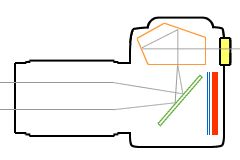
In order to avoid getting overly technical I've simplified this diagram and am highlighting the key elements.
If you really want to dredge into the specifics, you can do that at Wikipedia.
digital slr camera diagram
  1. Light passes through the lens and strikes a mirror (green)
  2. The mirror reflects the light up to a focusing screen
  3. Light passes through the focusing screen and enters a block of glass called a pentaprism (orange)
  4. The pentaprism reflects the image so that you can see it in the viewfinder
  5. When you take a photo, the mirror flips up and a shutter (blue) opens that exposes the digital sensor (red) to light
This is a great example of what-you-see-is-what-you-get. By using the viewfinder you can precisely compose your image and adjust the focus.
Is ithe image that you see in the viewfinder 100% accurate? In most cases it isn't.
If you read digital SLR camera reviews, you may hear a lot about viewfinder "coverage" and "brightness".
Many digital SLR viewfinders only show you 95% of the image that will be captured by the sensor - this is what "coverage" refers to. Unless you are extremely precise when it comes to your photographs you won't notice the 5% difference.
Digital SLR viewfinders also vary in brightness, which is another way of saying how clear the image appears. "Bright" viewfinders make it easier to use manual focus, since you can clearly see the details of your subject.

A Lens For Every Occasion

tamron 28-75mm f/2.8
In addition to the pentaprism viewfinder, one of the key features of any digital SLR camera is the ability to change lenses.
Most people think that the camera alone is responsible for capturing an image, but this isn't the case.
The lens that's attached to it can play a huge role in the color, contrast and clarity of every single photo that you take.
Owners of digital SLR cameras can buy lenses that match their photography style, since a landscape photographer should not use the same lens as a wildlife photographer.
The ability to swap lenses at any time adds to the versatility of a digital SLR camera, and means that even if your photography needs change in a couple years, you won't have to buy a new camera, you'll just need a different lens.

What's Next

Hopefully you're starting to feel more comfortable about this whole digital SLR camera thing.
If close friends pop the question "what is a digital SLR?" you'll be able to respond in an educated fashion (just throw out the term "pentaprism" and watch their eyes go wide).
Let's take it a step further.
I am a digital SLR enthusiast - this web site probably gives that away. I think that there are many advantages of digital SLR cameras.
But I also know that there are many features of compact digital cameras that aren't available on digital SLRs.
These two articles present both sides of the coin so that you can make an informed camera-buying decision:
If you already feel quite confident that a digital SLR is the right camera for you, and have been following along with the step-by-step guide to buying a digital SLR, it's time for Step 2 - Part II: defining digital SLR terms.
A clear understanding of digital SLR jargon will help you decide which camera features you must have — and which ones you can live without.

STEP 3

Are you ready to get started on some digital SLR camera comparisons?
Before you jump in, it helps if you have some idea of what you love to photograph and what some of the camera jargon - like megapixels, ISO, live view and image stabilization - means.
Why? Because this knowledge will make your digital SLR camera comparisons 100 times easier.
Here's a pop quiz to help you out:
  1. Are you an action or portrait photographer?
  2. What are dust control and live view?
If you're not sure about question one, then take some time to think about what you love to photograph. If it's question two that has you stumped, then take a quick refresher course in digital SLR terminology.
If you know the answer to both, then keep reading to discover the easiest way to make your digital SLR camera comparisons.

The Digital SLR Matching Game

Let's play a matching game.
It's fun, and the goal is to save you time. If this works, you won't have to compare every digital SLR camera on the market, just a few.
Let's begin with your favorite photographic style:
  • Action and Sports
  • Portrait
  • Landscape
  • Macro
  • Night/Low Light
  • Travel/Outdoor
  • Indoor
  • Spontaneous
  • Planned/Studio
Do you remember the one you identified with? Did you write it down?
If not, go back to Step 1 right now and decide which one best describes your photography style. Don't worry, I'll wait.
Got your photographic style? Good.
In the following table, the photographic styles are on the left, and the most important camera features to look for are on the right.
Find your style, and you'll see just what features you need in your digital SLR camera.
This process should make your digital SLR camera comparisons significantly easier.
Action and Sports
  1. High continuous speed
  2. Large buffer
  3. Fast multi-point autofocus
Portrait
  1. Image stabilization
  2. Live view LCD
  3. Color control (especially flesh tones)
Landscape
  1. Image stabilization
  2. Extended dynamic range
  3. Dust control
  4. Color control (especially earth tones)
Macro
  1. Image stabilization
  2. Live view LCD
  3. Compatible with macro lenses
Night/Low Light
  1. Image stabilization
  2. Low noise at high ISO settings
  3. Image noise reduction for slow shutter speeds
  4. Remote shutter release
Travel/Outdoor
  1. Image stabilization
  2. Small size and low weight
  3. Extended dynamic range
Indoor
  1. Image stabilization
  2. Low noise at high ISO settings
  3. Lots of external flash options
Spontaneous
  1. Fast multi-point autofocus
Planned/Studio
  1. Live view LCD
  2. Compatible with lighting accessories
Any digital SLR camera is compatible with more than one photography style.
Find a camera that matches your primary photographic need first, and then see how well it works for other photography styles.
Example: if you enjoy action and sports photography, consider the best digital SLR for action. This camera will also take beautiful landscapes and portraits, but if you purchase a slower camera you might be disappointed with your action and sports shots.

Start Your Digital SLR Camera Comparisons

Now you can really begin your digital SLR camera comparisons.
You're not only informed about your photographic style, you also know exactly what features to look for.
There are three ways that you can tackle this step:
1 - Compare By Features
If you go this route, you need to select the one camera feature that's most important to you.
Maybe it's the speed of the camera, or how much it costs.
Whatever the defining feature may be, there is probably a digital SLR out there that will match your needs.
  • Megapixels - if you're positive you want to print at large sizes, then you need a camera with a lot of megapixels.
  • Cost - don't have Donald Trump's income? You might be looking for an inexpensive digital SLR.
  • Ratings - find out what others think and which digital SLR gets the highest ratings by users.
  • Size - when you don't want to lug around a brick all day, a small-sized digital SLR is ideal.
  • Special Features - looking for a DSLR that captures video? This is one of many several special features.
2 - Find the Best
This approach to digital SLR camera comparisons is for those who only want the best.
Let me say this first: the best is relative.
The cameras that I present in this section are my choices as the best digital SLRs in each category. No panel of judges was involved.
I justify my "best of" camera choices in detail, so you can see how I reached my conclusions.
If this approach is helpful to you, then find out what's the best digital SLR camera.
3 - Read a Guide
This technique is for those who like details.
Rather than finding out what I think are the best cameras, or deciding ahead of time which feature is most important, you'd like to find out the specifics of each digital SLR camera.
That's what the in-depth digital SLR camera guides on this site are all about.
They'll walk you through all of the camera features, and identify the pros and cons of each one. You'll get to see plenty of photo samples taken by the camera along the way.
Once you're finished with a digital SLR camera guide, you'll have a much better sense of whether or not the camera is the best digital SLR for you.

Thursday, December 30, 2010

Buying a digital SLR

Why a digital SLR? 

     So you've decided to invest in a new digital camera and have made your mind up that you want to step up to a digital SLR, but the huge range of models on offer and endless flow of technical jargon have left you more confused than when you started? Fear not, this page will take the pain out of choosing the perfect digital SLR for you, whether you're a seasoned shooter or a total novice. 

     Before we get down to business it's worth stopping for a moment to ask the question: why would anyone want a digital SLR when compact digital cameras are so much smaller, lighter and more affordable? The answer can be summed up in two words: versatility and image quality.

The versatility isn't just the fact you can change lenses and add a wide range of accessories - from basics such as flashguns and remote controls to the more specialized equipment that allow SLRs to capture anything from the tiniest bug to the most distant stars. It's also about the creative versatility offered by the more advanced controls and higher quality components.
And this leads on to the second factor; image quality. In broad daylight the quality difference between a good compact and a digital SLR is minimal; both will produce sharp, colorful results with little effort. But when you start to push the boundaries a bit more; shooting in low light, attempting to capture fast moving sports action or wildlife, or when you want to experiment with shallow depth of field (to add a soft background to a portrait for example), the advantage of a digital SLR's larger sensor and higher sensitivity start to make a big difference. A digital SLR can't beat a compact camera for 'pop it in the purse or pocket' convenience but for serious photography the SLR wins hands down. With prices lower than ever it's not that surprising to discover that many people own one of each.

What is an SLR?

The basic physical design of the SLR has remained essentially unchanged for over half a century. The name itself, 'Single Lens Reflex', refers to the hinged mirror that bounces the light passing through the lens up to the viewfinder for framing then flips out of the way when you press the shutter to allow the light to hit the sensor (or film).

As the (simplified) diagram above shows, the mirror inside an SLR reflects the image formed by the lens up to the optical viewfinder (via a focusing screen and prism). When the picture is taken the mirror flips out of the way to allow the light to fall directly onto the sensor (or film), which sits behind a mechanical shutter. The mirror is also flipped up for live view operation (where the sensor is used to provide a live video feed directly to the screen on the back). More on this - and on the newer 'mirrorless' hybrid cameras at the bottom of this page.

What do you need?


With so many digital SLRs on the market at so many different price points it's a good idea to narrow down your options by thinking about what 's important to you, and what you want to do with the camera. Do you want the same kind of 'point and shoot' simplicity as you get with a compact camera or are you the type of photographer who likes to roll up his or her sleeves and take control of every function? Many entry-level DSLRs offer a range of 'point and shoot' subject / scene modes, whereas more 'professional' models don't (though all have a basic 'auto' program mode). Do you shoot a lot of sport or wildlife? If so you'll need a fast camera with a high frame rate, and will probably want one of the smaller sensor formats.

If you shoot in very low light you'll be looking for a camera with the best possible high ISO performance and possibly in-body image stabilization, if you do a lot of studio, portrait or macro work you may well decide that a 'live view' function is a high priority.
Finally there are practical considerations; do you need a particularly rugged (or weatherproof) body? Does the size and weight of the camera play an important role in your choice? Do you have a particular application in mind that requires a specialist lens or other accessory? Not all camera systems offer the same range of lenses and not all cameras are compatible with the more specialized add-ons. And don't forget that most DSLRs are compatible with many of the lenses and accessories originally designed for film SLR cameras (from the same manufacturer), so if you're already heavily invested in a film system you may want to stick to the same system when you move to digital.
Armed with some answers to these questions you can use the information on the rest of this page to produce a shortlist of cameras that match your needs perfectly.

Sensor size

Let's look first at the physical size of CCD or CMOS sensor used to capture your photographs. Although there are slight variations, virtually all DSLR sensors fit into one of three size categories (starting with the largest); Full Frame, APS-C and Four-Thirds. Sensor size isn't as important as some people would have you think, but there are some key differences. The first is what is known as the 'crop factor'. As the diagram below shows, as the sensor gets smaller it captures a smaller area of the scene, resulting in a photograph that looks like it was taken at a longer focal length (1.5x or 1.6x longer for APS-C, 2x for Four-Thirds).

The crop factor isn't a major issue for most users, but it does have important consequences for some. If you're buying a digital SLR to replace a film model because you've got a kit bag full of lenses you need to be aware that unless you buy a full frame model all your lenses will produce very different results on your new camera.
For telephoto shooters the result is quite a bonus, as all your lenses will effectively get even more powerful. On the other hand the crop factor means your wideangle lenses will no longer offer anything like a 'wide' field of view. Fortunately there is a wide range of specially designed 'digital only' lenses for smaller sensor DSLRs.


The three most common sensor sizes compared: full frame, APS-C and Four-thirds. Smaller sensors 'crop' the scene and make a lens appear to have a longer focal length.

 For sports and wildlife shooters the smaller sensor has the effect of making their telephoto lenses and zooms even more powerful.

So which is right for you? Each has its own benefits and each has its limitations, and if you're building a DSLR system from scratch you needn't get too hung up on which is right for you.
The largest (and most expensive) DLSR format is full frame (so called because the sensor is the same size as a frame of 35mm film). DSLRs with full frame sensors have the biggest, brightest viewfinders and because there's no crop factor are often chosen by photographers who are upgrading from a film SLR and already own expensive wideangle lenses. The larger sensor also means that - all other things being equal - full frame cameras will produce the best results in very low light and at higher sensitivities. On the downside, full frame cameras are big and expensive, and there is only a handful of models to choose from. You also lose the focal length 'boost' offered by smaller sensor cameras when shooting with telephotos.

 The larger the sensor the easier it is to get very shallow depth of field effects. The flip side of this is that it can be harder to get everything in focus when you do want to. Overall though, the larger sensors offer more control over depth of field for those that know how to use it.

APS-C is by far the most common format, used in virtually all Canon, Nikon, Pentax and Sony DLSR models. With a crop factor of 1.5x or 1.6x you need special digital lenses to get true wideangle results, but these are readily available and are usually less expensive than their 'full frame' counterparts. The 'kit lens' supplied with most APS-C cameras is a good starting point, offering a versatile zoom range from wideangle to short telephoto.
Four Thirds is a new 'all digital' format developed by Olympus and currently used in Olympus and Panasonic DSLR models. Unlike the other systems on the market Four Thirds is not based on any existing film SLR system and uses a totally new lens mount, so all the lenses in the system are designed for digital, making the crop factor issues mentioned above less relevant. With the smallest sensor size Four Thirds offers slightly more compact camera bodies and lenses. Although the smaller sensor should in theory mean that these cameras produce noisier (grainier) results in low light and at higher sensitivities, for most purposes the difference isn't huge.

Anti shake systems 

Photos taken in low light or with long telephoto lenses can easily be ruined by blur caused by the camera moving during the exposure (camera shake). Image stabilization (IS) systems are designed to counteract the motion of camera shake and reduce (or eliminate) the resultant blurring. Every manufacturer has a different name for it ('Super SteadyShot', 'Anti Shake', 'Vibration reduction', Mega OIS'), but all use one of two techniques. Optical IS works by moving a small element inside the lens and is totally separate from the camera. Sensor shift IS - as the name implies - moves the sensor itself. Note that the terms 'optical' and 'mechanical' IS are often used interchangeably.

Image stabilization systems reduce the blur caused by camera shake, allowing sharp pictures to be taken even in low light or at long focal lengths.

The net result is the same, though obviously sensor IS is built in to the camera, so offers its benefits to every lens you buy. Lens IS has the advantage of stabilizing the view through the viewfinder as well as reducing blur in the final picture, but if you intend to buy several lenses it can end up being more expensive as stabilized lenses cost more than their non-stabilized equivalents. At the moment Sony, Pentax and Olympus offer in-body sensor stabilization, whereas Canon, Panasonic and Nikon offer stabilized lenses (including standard 'kit' lenses).

Speed

If you're used to using a compact digital camera picking up and taking pictures with a digital SLR will be a revelation; even entry-level models focus and shoot faster than any compact. As you move up the range to more expensive models focus speed will increase slightly, but the real difference is continuous shooting frame rate, something of vital importance to sports and wildlife photographers. Most entry level DSLRs offer a continuous shooting rate of around 2.5 or 3 frames per second; plenty enough for most casual photographers trying to snap the kids or pets running around the back yard. The most basic models limit the number of shots you can take in a single 'burst' (especially if you're shooting in the highest quality RAW mode), but again this isn't likely to trouble the average user.
If you do have real 'need for speed' you'll need to leave the entry-level behind and move into the mid range or semi-professional sector. Here the starting point is 5 frames per second (though if money is no object the Canon EOS 1D Mk IV and Nikon D3s can deliver 10 and 11 frames per second respectively), and larger 'buffer' memory means you can take a lot more frames in a single burst.

Screens and live view 

One of the defining features of an SLR camera is that you frame the picture by looking through the same lens that takes the picture (by looking through the viewfinder). And many users moving from a compact to a DSLR in the past few years have been surprised to discover that you can't use the color screen on the back of the camera to frame the pictures in the same way you can with a compact. That's all changing as more and more models offer a 'Live View' option that does just that.
Live view isn't without its drawbacks; in most cases it slows down the picture taking process in use as the design of an SLR means the mirror inside the body has to be flipped up to enable live view and flipped back down to focus or take a shot. Some models allow auto focus in live view mode (without the mirror flips), but this is often a fairly slow process. The only exception is Sony, with its unique 'dual sensor' live view system, which is fast, but currently cannot offer a high resolution live view image.

LCD screens have come on in leaps and bounds in recent years and 2.5 or 3.0 inch LCDs are now common. Some models offer very high resolution screens for an ultra-clear picture, though of course this adds a premium to the price.
That's not to say live view isn't a useful feature; in the studio the ability to magnify a portion of the display to check focus is a real boon, and the fact you don't need to put your eye to the viewfinder can make shooting from very awkward positions (such as low on the ground or with the camera above your head) considerably easier.
Some DSLRs even have articulated screens that can be angled to offer a better view when getting behind the camera is difficult.

Ease of use features

With entry-level digital SLRs now aimed at first-time users and those who might normally choose a compact camera, many of the ease of use features (on-screen guides, intelligent automatic modes, on-screen guides, face detection and so on) common on compacts have started to appear here too. Although any SLR can be used in simple 'point and shoot' mode, some models go a lot further in helping you get the right shot than others.

On-screen guides, intelligent automatic modes and compact camera-like 'fun' features (such as special effects and face detection) are starting to appear on entry-level SLR models. ideal if you find the idea of using this kind of camera daunting.

Advanced photography features

Although all digital SLRs share a common base feature set as you move up the ranges you'll find more and more advanced features and more controls that may or may not be of importance to you. You'll also find that higher level SLRs offer far more customization options, allowing you to fine tune every aspect of the camera's operation. Many of these functions and options will be of interest only to the more advanced photographer.

Movie modes

IAs a direct consequence of the introduction of Live View to SLRs, n the last couple of years HD movie modes have started to appear on many digital SLRs. Video capable SLRs may be the new kids on the block, but they're already making a splash with both amateur videographers and serious movie makers. The main reason is that big sensor, which allows Hollywood-style focus effects and excellent image quality, even in low light, and the versatility offered by the huge range of lenses (from fisheyes to extreme telephotos) is opening up a new world of creative possibilities.
Most video-enabled SLRs can't autofocus during movie clips, and some only offer rudimentary manual controls, but all are capable of surprisingly good results.

System addict...

One last word. Buying an SLR is, for many people, only the first step on what can become a lifelong relationship with a specific camera system, so it's important to look at the 'bigger picture' when making your choice. The camera is only part of the equation when it comes to image quality; the lens has an equally important role to play. Most of the major players have broadly similar lens options (and there's plenty of third-party alternatives for those that don't), but inevitably each has its relative strengths and weaknesses. If you have a specific application that needs specialized lenses (or other accessories) it's worth doing some research before committing to one system or another.

 source www.dpreview.com/reviews/nikond700/

Wednesday, December 29, 2010

Top 10 Tips for Great Pictures

Do you wish you were a better photographer? All it takes is a little know-how and experience. Keep reading for some important picture-taking tips. Then grab your camera and start shooting your way to great pictures.

~Look your subject in the eye 
     Direct eye contact can be as engaging in a picture as it is in real life. When taking a picture of someone, hold the camera at the person's eye level to unleash the power of those magnetic gazes and mesmerizing smiles. For children, that means stooping to their level. And your subject need not always stare at the camera. All by itself that eye level angle will create a personal and inviting feeling that pulls you into the picture.

~Use a palin background
     A plain background shows off the subject you are photographing. when you look through the cameraviewfinder.force yourself  to study the area surrounding your subject. make sure no poles grow from the head of your favorite niece and no car seem to dangle from her ears.


~Use flash outdoors
     Bright sun can create unattractive deep facial shadows. Eliminate the shadows by using your flash to lighten the face. When taking people pictures on sunny days, turn your flash on. You may have a choice of fill-flash mode or full-flash mode. If the person is within five feet, use the fill-flash mode; beyond five feet, the full-power mode may be required. With a digital camera, use the picture display panel to review the results.
On cloudy days, use the camera's fill-flash mode if it has one. The flash will brighten up people's faces and make them stand out. Also take a picture without the flash, because the soft light of overcast days sometimes gives quite pleasing results by itself.

~move in close
     If your subject is smaller than a car, take a step or two closer before taking the picture and zoom in on your subject. Your goal is to fill the picture area with the subject you are photographing. Up close you can reveal telling details, like a sprinkle of freckles or an arched eyebrow.
But don't get too close or your pictures will be blurry. The closest focusing distance for most cameras is about three feet, or about one step away from your camera. If you get closer than the closest focusing distance of your camera (see your manual to be sure), your pictures will be blurry.

~move it from middle.
     Center-stage is a great place for a performer to be. However, the middle of your picture is not the best place for your subject. Bring your picture to life by simply moving your subject away from the middle of your picture. Start by playing tick-tack-toe with subject position. Imagine a tick-tack-toe grid in your viewfinder. Now place your important subject at one of the intersections of lines.
You'll need to lock the focus if you have an auto-focus camera because most of them focus on whatever is in the center of the viewfinder.

~Lock the focus
     If your subject is not in the center of the picture, you need to lock the focus to create a sharp picture. Most auto-focus cameras focus on whatever is in the center of the picture. But to improve pictures, you will often want to move the subject away from the center of the picture. If you don't want a blurred picture, you'll need to first lock the focus with the subject in the middle and then recompose the picture so the subject is away from the middle.
Usually you can lock the focus in three steps. First, center the subject and press and hold the shutter button halfway down. Second, reposition your camera (while still holding the shutter button) so the subject is away from the center. And third, finish by pressing the shutter button all the way down to take the picture.

~Know your flash range
     The number one flash mistake is taking pictures beyond the flash's range. Why is this a mistake? Because pictures taken beyond the maximum flash range will be too dark. For many cameras, the maximum flash range is less than fifteen feet—about five steps away.
What is your camera's flash range? Look it up in your camera manual. Can't find it? Then don't take a chance. Position yourself so subjects are no farther than ten feet away. Film users can extend the flash range by using Kodak Max versatility or versatility plus film.

~Watch the light
     Next to the subject, the most important part of every picture is the light. It affects the appearance of everything you photograph. On a great-grandmother, bright sunlight from the side can enhance wrinkles. But the soft light of a cloudy day can subdue those same wrinkles.
Don't like the light on your subject? Then move yourself or your subject. For landscapes, try to take pictures early or late in the day when the light is orangish and rakes across the land.

~Take some vertical picture
     Is your camera vertically challenged? It is if you never turn it sideways to take a vertical picture. All sorts of things look better in a vertical picture. From a lighthouse near a cliff to the Eiffel Tower to your four-year-old niece jumping in a puddle. So next time out, make a conscious effort to turn your camera sideways and take some vertical pictures.

~Be a picture director 
     Take control of your picture-taking and watch your pictures dramatically improve. Become a picture director, not just a passive picture-taker. A picture director takes charge. A picture director picks the location: "Everybody go outside to the backyard." A picture director adds props: "Girls, put on your pink sunglasses." A picture director arranges people: "Now move in close, and lean toward the camera."
Most pictures won't be that involved, but you get the idea: Take charge of your pictures and win your own best picture awards.